
Phone in the browser
Incoming calls ring for every operator who is signed in, and the first one to answer takes it. You can also call your customers, with mute, keypad and mic and speaker selection.
SieFlow Phone is a phone and shared inbox for your team's WhatsApp Business number. They answer and make calls from the browser, reply to chats and share the conversations. You run it on your own server, in one container.

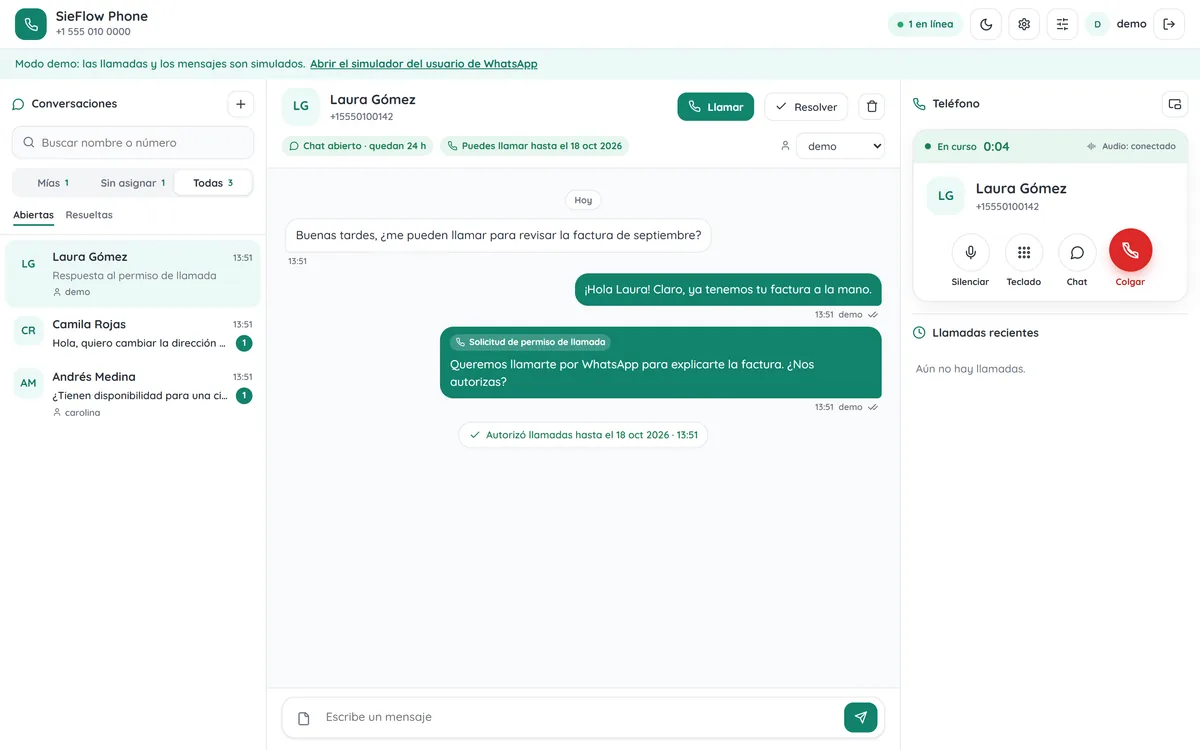
Screenshot from demo mode, with made-up data.
Built for small support and sales teams: a few operators, one WhatsApp number and nothing to install on their computers.
Incoming calls ring for every operator who is signed in, and the first one to answer takes it. You can also call your customers, with mute, keypad and mic and speaker selection.
Messages and calls from each customer in one thread: text, photos, voice notes, documents and locations. Mine, unassigned and all, with assignment and resolve.
WhatsApp needs the customer to allow calls. You ask with an interactive message inside the 24-hour window, or with a template outside it, and the answer shows up in the thread.
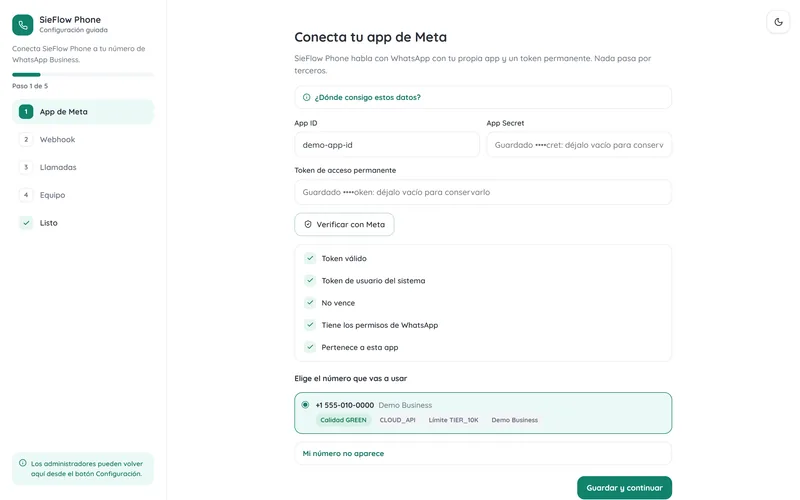
A setup screen in the browser checks your Meta app and token live, finds your numbers, configures the webhook and tells you what is missing to turn calls on.
Pop the phone out into a window that stays on top, like a mini player, and keep talking while you work in another app (Chrome and Edge).
Settings, operators, conversations and call logs are stored in your install. You decide how many days to keep them, and you can delete a contact with all their history.
When a customer calls or writes, WhatsApp sends a signed webhook to your server, which passes it to the operators who are signed in.
The browser sets up the call with standard WebRTC and SieFlow Phone accepts it through the WhatsApp Cloud API. The server only carries the signaling.
The voice travels encrypted (DTLS-SRTP) between the browser and WhatsApp's media servers. No PBX, no SIP server and no media server.
Guided setup
A new install asks for everything in the browser. The first admin signs in with a one-time code printed in the server logs, so nobody else can claim the instance.
One container with zero npm dependencies. Caddy gets the HTTPS certificate and, if your operators sit behind strict firewalls, the coturn profile adds TURN.
Try it in one minute
Demo mode simulates WhatsApp, with made-up data and a customer simulator. When it starts, open localhost:8080.
docker run --rm -p 8080:8080 -e DEMO_MODE=true ghcr.io/integralaia/sieflow-phoneOn your server
Docker with Compose, a domain pointing to the server and ports 80 and 443 free. Then follow the guided setup.
mkdir sieflow-phone && cd sieflow-phone
curl -fsSLO https://raw.githubusercontent.com/IntegraLaIA/sieflow-phone/main/docker-compose.yml
curl -fsSLO https://raw.githubusercontent.com/IntegraLaIA/sieflow-phone/main/Caddyfile
echo "DOMAIN=phone.example.com" > .env
docker compose --profile https up -dWith your AI assistant
Give this message to your coding agent with shell access. The install guide tells it what to ask before doing anything and not to print secrets.
Install SieFlow Phone on this server following https://raw.githubusercontent.com/IntegraLaIA/sieflow-phone/main/INSTALL-WITH-AI.en.mdThe same thing, without running a server. We'll host it, keep it updated and back it up for you.
Leave your email and we'll write when it opens. We'll only email you about SieFlow Phone Cloud.
Found a bug or have an idea? Open an issue on GitHub. Please report security issues through the private channel of the repo.
Issues on GitHubAn open source web phone and shared inbox for WhatsApp Business. Your team answers and makes WhatsApp calls from the browser and handles the chats, in a container you run on your own server.
SieFlow Phone is free: it is open source under the MIT license. You pay for your server and whatever Meta charges for WhatsApp messages and calls, at their rates.
No. The WhatsApp Cloud API sets up calls with standard WebRTC, so the browser talks straight to WhatsApp's media servers. SieFlow Phone carries the signaling and keeps the inbox.
A Meta app with a system user token and a WhatsApp Business number on the Cloud API with calling turned on. The guided setup checks each requirement live. Meta doesn't offer calling on numbers shared with the WhatsApp Business app (coexistence).
On your server: settings, operators, conversations and call logs live in a SQLite database inside the container's data volume. Call audio never goes through the server, and RETENTION_DAYS sets how many days messages are kept.
Yes, we're working on it: SieFlow Phone Cloud, the same thing without running a server. We'll host it, keep it updated and back it up. Pricing is not set yet. If you're interested, join the waitlist and we'll email you when it opens.
Yes. It stays open source under the MIT license, with no features held back. The cloud version is for teams that would rather not run a server.
Use it, change it and deploy it wherever you want. If it helps you, a star on GitHub helps more teams find it.
WhatsApp is a trademark of Meta Platforms, Inc. SieFlow Phone is an independent project, not affiliated with or endorsed by Meta.